
Grand Theft Timeline How to Install Mods: Steam Workshop Guide
Everything confirmed about Grand Theft Timeline how to install mods via Steam Workshop, the no-code AI mod kit, PC specs, and Early Access mod status.
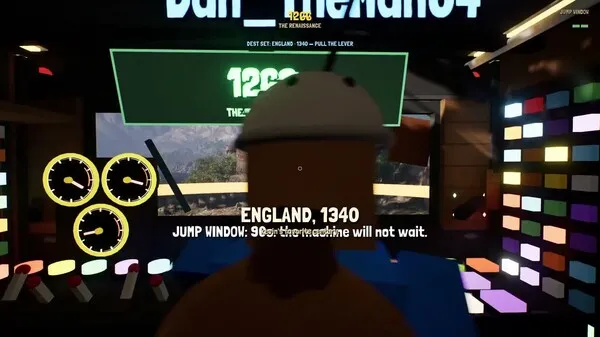
Players searching for Grand Theft Timeline how to install mods want a straightforward way to expand REAL PLAYERS’ chaotic time-travel heist sandbox beyond its base lineup of 200+ worlds and 2,000+ capturable NPCs. Knowing what is officially verified matters right now because the game is listed on Steam as Coming Soon to Early Access on November 19, 2026, meaning exact in-game menu layouts remain unconfirmed until launch unlocks. This guide covers everything confirmed about Grand Theft Timeline how to install mods, including Steam Workshop support, the bundled no-code AI mod kit, system requirements, and how to judge community creations once Early Access opens.
Official Mod Support Status in Grand Theft Timeline Early Access
Before downloading files or changing game folders, players researching Grand Theft Timeline how to install mods need a clear line between officially confirmed features and details still pending post-launch verification. According to the official Grand Theft Timeline Steam store page, the game is a paid PC title for 64-bit Windows 10+ (Steam App ID 4928450) developed and published by REAL PLAYERS, an indie studio associated with developer Tbjbu2.
The store listing schedules Early Access for November 19, 2026, with roughly 24 months of Early Access development planned toward a late-2028 full release. While final launch pricing is not yet published in the Steam API prior to unlock, Tbjbu2 previously estimated a $10–$20 range on Steam Discussions and noted the price may increase gradually over Early Access.
In the August 12 milestone update posted on Grand Theft Timeline Steam Community announcements, the developer confirmed that easy-to-use mod support for custom levels, loot, and NPCs was a top priority, while noting at the time that launch-day availability versus a slightly later update was still being finalized. By the November 19, 2026 store listing, both Steam Workshop integration and a bundled mod kit are highlighted directly among the game’s core features.
| Modding Detail | Current Status (as of Nov 19, 2026) | Verified Scope & Caveats |
|---|---|---|
| Steam Workshop Support | Officially Confirmed | Listed on Steam for downloading community worlds and mods |
| Included Mod Kit | Officially Confirmed | Ships with the game; designed for no-coding creation |
| Moddable Content Types | Officially Confirmed | Custom worlds/levels, loot, and NPCs cited by developer |
| External AI Tool Workflow | Officially Confirmed | Mod kit pairs with player-chosen AI tools like ChatGPT or Claude |
| In-Game Mod Manager / Load Order | Pending Verification | Exact UI toggles and activation menus are unconfirmed pre-unlock |
| Co-op Mod Syncing Behavior | Pending Verification | Auto-download vs. manual friend subscriptions unconfirmed |
| Manual Local Folder Installation | Pending Verification | No official file paths or non-Workshop loaders documented |
Because the earlier free private playtest organized through the official Discord server is now closed and prohibited public sharing, streaming, or videos, no verified post-launch screenshots or step-by-step in-game menu walkthroughs exist yet. Any site claiming exact folder directories, console commands, or third-party patch loaders before Early Access unlocks is speculating rather than citing official documentation.
Players interested in Steam Workshop and custom content can check the Built-In Mod Kit & AI Tools Guide.
How Steam Workshop Mod Installation Works for Grand Theft Timeline
Based on current official listings, the primary answer to Grand Theft Timeline how to install mods is Steam Workshop. Because the game is listed on Steam exclusively for 64-bit Windows 10+ PCs, Steam’s built-in Workshop ecosystem serves as the confirmed distribution hub for downloading community-made worlds and sharing player creations.
Once Early Access unlocks and the Workshop tab for App ID 4928450 populates with player uploads, the standard Steam Workshop workflow applies:
- Open your Steam client and navigate to Grand Theft Timeline in your Library.
- Select the Workshop tab on the game’s Steam Community hub to browse published worlds, NPCs, or loot packs.
- Click Subscribe on the mod you want to add so Steam automatically queues and downloads the files through your broadband connection.
- Launch the game and check the in-game menu or world selector for subscribed content—exact in-game toggles or activation checkboxes will be confirmed once the live Early Access build is accessible.
Multiplayer groups planning around Grand Theft Timeline how to install mods should also account for how co-op sessions work. The Steam store page confirms Single-player and Online Co-op for 1–4+ players alongside Steam Cloud and Family Sharing. In Steam Discussions, Tbjbu2 clarified that multiplayer is restricted to single-player or friends-only private sessions, with no public matchmaking lobbies and no couch split-screen co-op. Until post-launch testing verifies whether a host’s Workshop worlds stream automatically to joining friends, crews should expect every participant to subscribe to the same Workshop items before starting a run.
| Requirement Category | Official Steam Minimum Spec | Why It Matters for Modded Play |
|---|---|---|
| Operating System | Windows 10+ (64-bit) | Only platform listed on the official Steam store page |
| Processor | Intel Core i5-7400 (3.3 GHz) or AMD Ryzen 3 3300X | Handles physics combat and large NPC crowds |
| Memory | 8 GB RAM | Baseline memory before loading extra custom assets |
| Graphics | NVIDIA GeForce GTX 1050-Ti or AMD Radeon RX 5500 XT | Minimum GPU for rendering base and community worlds |
| Network | Broadband Internet connection | Required for online co-op and Steam Workshop downloads |
| Storage | 10 GB available space | Covers the base game; leave extra space for Workshop packs |
Note that the official Steam listing does not separately detail recommended hardware beyond a 64-bit processor and operating system. Keeping extra free storage beyond the 10 GB minimum is practical if you plan to subscribe to multiple community worlds during Early Access.
Players interested in Steam Workshop and custom content can check the Custom Worlds & NPCs Modding Guide.

Grand Theft Timeline - Official Announcement Trailer (REALPLAYERS)
General game footage used as fallback media. This is not a keyword-specific tutorial or device benchmark; use the cited references for factual claims.
Inside the Included No-Code AI Mod Kit and Creation Costs
Understanding Grand Theft Timeline how to install mods is only half the story, because REAL PLAYERS is also shipping a built-in mod kit aimed at players who have never written code. On the Steam store page’s AI Generated Content Disclosure, the developers state that they created an AI-supported mod engine so players can turn custom ideas into playable content without technical prerequisites, meaning portions of modded content can rely on player-directed AI generation.
Questions about pricing for that workflow were addressed directly in Tbjbu2’s developer reply on Steam Discussions. When a player asked whether AI mod creation would be free, Tbjbu2 explained that the mod kit tools themselves do not require an extra fee from the developer. Instead, players connect or use the mod kit alongside whichever external AI service they prefer, such as ChatGPT or Claude.
| Mod Kit Aspect | Officially Confirmed Detail | Source Context |
|---|---|---|
| Built-In Mod Kit Fee | Included with the paid game | Confirmed on Steam store page and developer reply |
| External AI Service Cost | Depends on player’s chosen AI provider and usage | Clarified by Tbjbu2 in Steam Discussions |
| Supported AI Examples | ChatGPT, Claude, or any AI tool a creator chooses | Named by Tbjbu2 in Nov 10 discussion thread |
| Coding Skill Required | None; no coding involved | Confirmed by Tbjbu2 (“vibecode” workflow) |
| Primary Publishing Hub | Steam Workshop | Listed on official Steam store page |
In that same thread, another player asked whether making mods essentially meant “vibecoding” them, and Tbjbu2 confirmed that creating mods requires no coding at all. Community reports in the discussion also show mixed early sentiment: while some players are curious about free-to-start tool access, at least one commenter voiced skepticism toward no-code AI modding and the studio’s launch-date marketing. Because the live mod kit documentation is not public prior to Early Access unlock, exact export steps, file validation rules, and moderation standards on Steam Workshop remain to be seen after launch.
To see how this connects to specific eras and heist targets, read the Theme Packs & World Chains Guide.
Grand Theft Timeline Best Mods: What Categories to Watch After Launch
Many players searching for Grand Theft Timeline how to install mods are simultaneously looking for a list of the Grand Theft Timeline best mods to download on day one. As of November 19, 2026, no verified ranking of the Grand Theft Timeline best mods exists because Early Access has not yet unlocked publicly and the closed Discord playtest barred participants from publishing footage or sharing builds.
Rather than guessing mod titles, players can evaluate early Workshop uploads by looking at the three moddable content pillars the developer has confirmed—custom worlds, custom NPCs, and custom loot—and seeing how each fits the base game’s core loop. Base gameplay revolves around launching a garage-built time machine across 200+ historical and fictional worlds grouped into 25+ story-like theme packs, knocking out and caging NPCs or bosses, vacuuming paradox in your homebase zoo to fuel further jumps, and pitting captures against each other in The Timeline Arena.
| Confirmed Mod Pillar | Base-Game System It Expands | What to Check on Steam Workshop Post-Launch |
|---|---|---|
| Custom Worlds & Levels | 200+ worlds and 25+ sequential theme packs | Stability with the time machine departure timer and boss maps |
| Custom NPCs & Bosses | 2,000+ capturable NPCs, crowds, and arena fighters | Cage compatibility, garage paradox output, and arena balance |
| Custom Loot & Weapons | World-specific guns, throwable props, and valuables | Sell value balance, stock economy impact, and co-op sync |
Once community creators begin publishing to Steam Workshop, strong early contenders for the Grand Theft Timeline best mods will likely be cohesive theme-pack worlds with working boss maps, creative throw-anything physics weapons, and well-balanced capturable NPCs that integrate cleanly with garage upgrades, shrunken pets, and skins without breaking crew progression.
Official Sources, Co-op Limits, and Safe Modding Practices
Because unofficial mod aggregators often publish placeholder files or outdated archives around major Steam launches, players checking Grand Theft Timeline how to install mods should stick strictly to verified developer channels until the Early Access ecosystem matures. No standalone public Steam demo is listed on the store page, and the earlier Discord playtest is officially closed, so avoid any external site claiming to host a “modded demo” or pre-launch installer.
| Official Resource | Where to Access It | Best Used For |
|---|---|---|
| Steam Store Page | official Grand Theft Timeline Steam store page | Verified launch status, specs, and Steam Workshop listing |
| Steam Announcements | Grand Theft Timeline Steam Community announcements | Official roadmap updates, playtest notices, and patch notes |
| Steam Discussions | Tbjbu2’s developer reply on Steam Discussions | Direct developer Q&A on mod kit rules and co-op limits |
| Developer Website | Tbjbu2’s official developer website | Official studio hub and press kit links |
For direct troubleshooting or post-launch mod support, Tbjbu2 also pins an official Discord server link inside the Steam Community announcements. Checking official patch notes before updating subscribed Workshop worlds is especially helpful during a planned 24-month Early Access cycle, since frequent game updates can affect community creations.
Frequently Asked Questions
Do you need third-party tools for Grand Theft Timeline how to install mods?
No third-party mod manager is confirmed or required based on official documentation. The Steam store page confirms native Steam Workshop support for downloading community worlds and mods alongside a built-in mod kit included with the game. Any manual folder workflows or external mod loaders remain unconfirmed until Early Access unlocks.
Is the Grand Theft Timeline AI mod kit completely free?
According to Tbjbu2 on Steam Discussions, the game’s included mod kit tools carry no separate fee from the developer. However, because players pair the mod kit with whatever external AI platform they choose—such as ChatGPT or Claude—any usage cost depends on the third-party AI service and prompt volume a creator selects.
What are the Grand Theft Timeline best mods right now?
There is no verified list of the Grand Theft Timeline best mods yet. As of November 19, 2026, the game is listed as Coming Soon to Steam Early Access, and participants in the closed Discord playtest were prohibited from sharing builds or public videos. Check the official Steam Workshop hub after launch for top-rated community worlds, NPCs, and loot packs.
Can you install mods on macOS, Linux, or consoles?
On the official Grand Theft Timeline Steam store page, only 64-bit Windows 10+ PCs on Steam are listed. No macOS, Linux, PlayStation, Xbox, Nintendo Switch, mobile, or VR versions are listed on Steam, so confirmed Steam Workshop modding applies to the Windows PC release.
Related guides: All Platforms & Steam PC Guide · REAL PLAYERS (Tbjbu2) Developer Profile · Beginner Guide
Related Articles
community
Grand Theft Timeline Discord: Official Invite, Support, and Playtest Status
Find the official Grand Theft Timeline Discord invite code, developer support thread, friends-only co-op rules, and closed playtest status.
community
Grand Theft Timeline Gold Team Explained: Confirmed Facts and Co-Op Guide
Searching for the Grand Theft Timeline gold team? See what is officially confirmed, how 1-4+ player Steam co-op works, and where mods fit in.
community
Grand Theft Timeline GTA 6 Joke Explained: Release Day & Co-Op Facts
Explore the Grand Theft Timeline GTA 6 release-day joke, Steam Early Access facts, 1-4+ co-op rules, PC specs, and community reports.
Was this helpful?
Thanks for the feedback!