
Grand Theft Timeline Platforms: Steam, Console, Mobile & VR
Check every Grand Theft Timeline game platform: Steam Windows PC support, PS5, Xbox, Switch, Mobile (iOS/Android), Mac, Linux, VR, and Roblox availability.
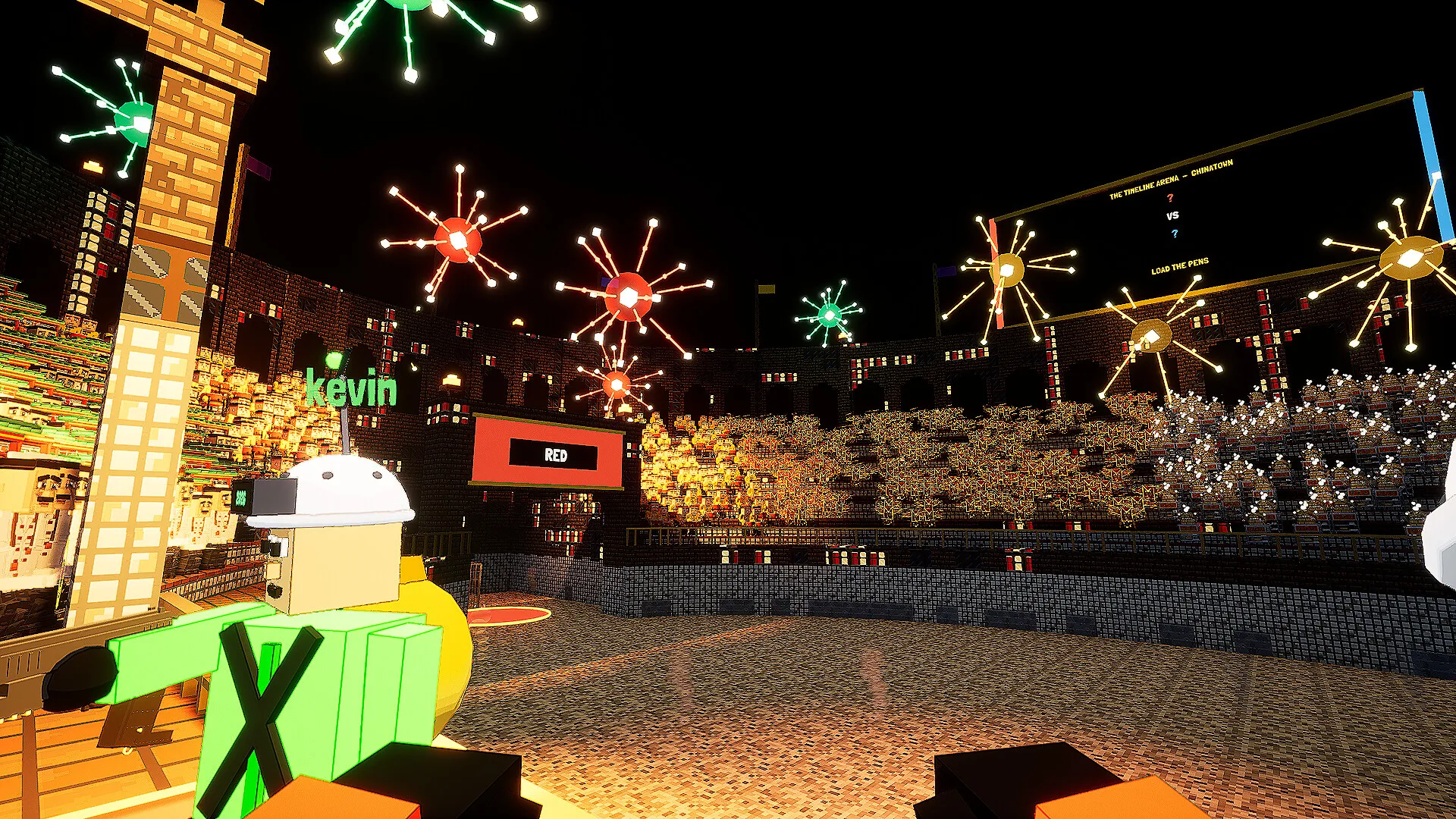
Figuring out which Grand Theft Timeline platforms are officially supported is the first step before organizing a four-player time-travel heist with your friends. Because the game launches into Steam Early Access with online co-op and built-in modding tools, knowing whether your hardware can run it—and whether console or Mac friends can join—prevents wasted setup time and surprise compatibility issues. Based on the latest official listings as of November 19, 2026, the confirmed Grand Theft Timeline platforms list starts exclusively with 64-bit Windows PC on Steam, while console, macOS, Linux, and mobile releases remain unannounced.
Confirmed Grand Theft Timeline Platforms and Release Status
Grand Theft Timeline (abbreviated GTT) is developed and published by REAL PLAYERS, a label associated with indie developer Tbjbu2. According to the official Grand Theft Timeline Steam store page, the game is registered under Steam App ID 4928450 and listed exclusively for 64-bit Windows PC (Windows 10+). In the store metadata collected on November 19, 2026, Windows support is enabled while both macOS and Linux flags are explicitly set to false.
The Steam page lists a November 19, 2026 Early Access release date, with the developers planning roughly 24 months in Early Access and targeting a full release around late 2028. Grand Theft Timeline is a paid release rather than a free-to-play title. Although the final storefront price was not yet published in the Steam API prior to unlock, developer Tbjbu2 estimated a $10–$20 launch range on Steam Discussions and noted that pricing could increase gradually throughout Early Access as new content arrives.
| Platform | Official Status (as of Nov 19, 2026) | Official Storefront or Channel | Availability Notes |
|---|---|---|---|
| Windows PC (64-bit) | Confirmed | Steam (App ID 4928450) | Requires Windows 10 or newer; Early Access launch |
| macOS | Not listed / Unannounced | None listed | Marked unsupported on the official Steam page |
| Linux | Not listed / Unannounced | None listed | Marked unsupported on the official Steam page |
| PlayStation 5 (PS5) | Unconfirmed / Unannounced | None listed | No official announcement on developer channels |
| Xbox Consoles | Unconfirmed / Unannounced | None listed | No official announcement on developer channels |
| Nintendo Switch | Unconfirmed / Unannounced | None listed | No official announcement on developer channels |
| Mobile (iOS / Android) | Unconfirmed / Unannounced | None listed | No official announcement on developer channels |
| VR / Roblox | Unconfirmed / Unannounced | None listed | No official listing or announcement exists |
If you are tracking Grand Theft Timeline platforms around launch, keep in mind that store details such as final regional pricing and post-unlock build updates are time-sensitive. Checking the live Steam page directly at unlock remains the only way to confirm exact regional pricing and current patch availability.
For hardware specs and Steam Deck status, check our PC System Requirements.
Grand Theft Timeline Console, Mac, Linux, Mobile, VR, and Roblox Status
Many co-op players are searching for a Grand Theft Timeline console, mobile, Mac, VR, or Roblox edition after seeing clips of its chaotic 1–4+ player time-travel heists. As of the November 19, 2026 official storefront records, only 64-bit Windows PC on Steam is listed across the official Grand Theft Timeline Steam store page, the Grand Theft Timeline Steam Community announcements, and the Tbjbu2 official developer website.
PlayStation 5 (PS5), Xbox, and Nintendo Switch
No PlayStation 5, PlayStation 4, Xbox Series X|S, Xbox One, or Nintendo Switch version has been announced by REAL PLAYERS or Tbjbu2. Because the team plans roughly 24 months of Steam Early Access through late 2028, console ports remain unconfirmed unless officially announced later in development.
Mobile (iOS and Android)
There is no official Android APK, Google Play listing, or iOS App Store release for Grand Theft Timeline. Any third-party site advertising a mobile download or mobile beta is unofficial and should be avoided.
Mac (macOS) and Linux
On the official Steam store metadata, both macOS and Linux are explicitly flagged as unsupported (Windows 10+ 64-bit only). Players on non-Windows computers or handheld Linux devices like the Steam Deck should review our PC System Requirements & Steam Deck Guide before purchasing.
VR Headset Support
Grand Theft Timeline is a standard flat-screen PC game on Steam. No official PCVR, SteamVR, PlayStation VR2, or Meta Quest support is listed on the store page.
Is Grand Theft Timeline on Roblox?
No. Despite its blocky yellow time-raider character art style—which frequently leads short-form video viewers to assume it is a Roblox experience—Grand Theft Timeline is a standalone paid Steam PC game (App ID 4928450) developed by REAL PLAYERS, not a Roblox game.
Because the team plans an approximately two-year Early Access cycle running into late 2028, players hoping for additional platforms should follow official developer channels directly:
- Subscribe to the mailing list on the Tbjbu2 official developer website for major release announcements.
- Monitor the Grand Theft Timeline Steam Community announcements feed for Early Access milestone posts.
- Check the pinned Steam Discussions support thread where Tbjbu2 shares official community updates and support.
For launch timing and paid pricing details, see our Release Date & Early Access Roadmap.

Grand Theft Timeline - Official Announcement Trailer (REALPLAYERS)
General game footage used as fallback media. This is not a keyword-specific tutorial or device benchmark; use the cited references for factual claims.
Official PC System Requirements for Steam Early Access
Because Windows PC is the sole confirmed entry on the Grand Theft Timeline platforms roster, verifying your rig against the official Steam minimum specifications is essential before inviting friends. The requirements listed on the official Grand Theft Timeline Steam store page target relatively accessible mid-range hardware from several generations ago, though the developers have not yet published a separate recommended hardware tier beyond a 64-bit processor and operating system.
| Specification | Official Minimum Requirement (Steam) | Official Recommended Requirement |
|---|---|---|
| Operating System | Windows 10+ (64-bit) | 64-bit operating system (no further details listed) |
| Processor (CPU) | Intel Core i5-7400 @ 3.3 GHz or AMD Ryzen 3 3300X | 64-bit processor (not separately detailed) |
| Memory (RAM) | 8 GB RAM | Not separately detailed on Steam |
| Graphics (GPU) | NVIDIA GeForce GTX 1050-Ti or AMD Radeon RX 5500 XT | Not separately detailed on Steam |
| Network | Broadband Internet connection | Not separately detailed on Steam |
| Storage | 10 GB available space | Not separately detailed on Steam |
Practically speaking, these baseline specs make Grand Theft Timeline approachable on older desktop PCs and budget gaming laptops. An Intel Core i5-7400 or AMD Ryzen 3 3300X paired with 8 GB of RAM and a GTX 1050-Ti or RX 5500 XT represents a modest entry point compared to many modern 3D releases. The 10 GB storage footprint is also compact, leaving plenty of room for Steam Workshop downloads once community-built worlds begin circulating.
Keep two hardware caveats in mind before launch. First, a 64-bit Windows 10 or newer environment is mandatory, so older 32-bit setups will not run the build. Second, because full recommended specs are still missing from the Steam listing, performance scaling during large physics-heavy fights—such as hordes of 100 one-hit mummies or crowded four-player garage sessions—remains pending post-launch Early Access testing.
If you are organizing a squad or playing solo on Steam, check our Multiplayer & Co-Op Guide.
Steam Platform Features, Co-Op Modes, and Mod Support
Platform choice shapes more than just where you buy a game; it also determines multiplayer rules, save handling, and modding access. On Steam, Grand Theft Timeline combines solo play with online co-op for 1–4+ players while integrating key Valve ecosystem features. However, developer Tbjbu2 has also clarified several multiplayer boundaries on Steam Discussions that groups should understand before picking up copies.
| Feature or Mode | Status on Steam PC | Confirmed Official Details |
|---|---|---|
| Single-Player | Supported | Playable solo across worlds and progression loops |
| Online Co-Op | Supported (1–4+ players) | Requires broadband internet; friends-only sessions |
| Public Matchmaking / Open Lobbies | Not supported | Confirmed by Tbjbu2 on Steam Discussions as solo or friends only |
| Local Couch Co-Op / Split-Screen | Not supported | Explicitly ruled out by Tbjbu2 on Steam Discussions |
| Crossplay | Not listed | No cross-platform play is listed on the Steam store page |
| Steam Cloud | Supported | Listed among official Steam store categories |
| Steam Family Sharing | Supported | Listed among official Steam store categories |
| Steam Workshop & Mod Kit | Supported | Built-in mod kit included for community worlds, loot, and NPCs |
Understanding these multiplayer rules matters if you are planning group nights. Because there are no public matchmaking lobbies and no local split-screen option, every co-op participant needs their own Steam-compatible Windows PC and an internet connection to join a friends-only session. On the bright side, Steam Cloud support makes moving saves between Windows machines straightforward, and Steam Family Sharing is enabled on the store listing.
Modding is another major pillar tied closely to the PC platform. After announcing 100,000 wishlists in a single month on August 12 via the Grand Theft Timeline Steam Community announcements, the developer emphasized prioritizing accessible mod support so players could create custom levels, loot, and NPCs. The official Steam page now highlights full Steam Workshop integration paired with an included mod kit designed for players without coding experience. The store page also transparently discloses an AI-supported mod engine that allows portions of modded content to incorporate AI generation.
Demo Availability, Closed Playtest, and What Launches on PC
Players researching Grand Theft Timeline platforms often want to know whether they can test performance on their Windows PC before buying. According to the official Grand Theft Timeline Steam store page, there is no standalone public Steam demo available. While the developers ran a free private playtest—playable solo or with friends—through the official Discord after an October 24 announcement on the Grand Theft Timeline Steam Community announcements hub, that playtest has been officially edited and marked closed. During that private test, participants were also prohibited from streaming, sharing, or posting public videos.
Even without an active demo, the Steam listing outlines an unusually broad Early Access feature set for PC players jumping in at launch. You and your crew operate a garage-built time machine where every button triggers an effect—and where getting left behind when the machine departs brings you back decades older or as a baby. Across 200+ worlds spanning history and fiction, grouped into 25+ story-style theme packs, players fight crowds, throw nearby objects when ammo runs dry, ride mounts or vehicles while teammates shoot from the back, steal valuables, and capture over 2,000 NPCs and world bosses in cages.
| Early Access Category | Official Steam Store / Announcement Detail | Verification Status |
|---|---|---|
| Planned Early Access Span | Roughly 24 months (targeting late 2028 for full release) | Officially stated on Steam |
| Pricing Structure | Paid game; developer estimated $10–$20, may rise gradually | Final store price pending Steam unlock |
| Public Demo / Playtest | No public Steam demo; private Discord playtest is closed | Officially confirmed closed |
| Worlds & Theme Packs | 200+ worlds (history and fiction) across 25+ theme packs | Listed on official Steam store page |
| NPCs, Bosses & Arena | 2,000+ capturable NPCs, a boss per world, Timeline Arena colosseum | Listed on official Steam store page |
| Homebase & Meta Systems | Garage Paradox zoo, upgrades, stocks, outfits, gun skins, shrunken pets | Listed on official Steam store page |
Back at your garage homebase, captured NPCs live in cages and drip Paradox that you vacuum up while feeding them to fuel deeper timeline trips. Cash from stolen valuables funds time-machine upgrades, new guns, garage expansions, cosmetics, shrunken capture pets, and risky crew investments in in-game stocks such as “DEFINITELY NOT A RUG,” while Roman colosseum bouts in The Timeline Arena unlock further worlds. Checking the official Steam page after launch will clarify how each system performs in live Early Access builds.
Frequently Asked Questions About Grand Theft Timeline Platforms
What are the confirmed Grand Theft Timeline platforms right now?
As of November 19, 2026, the only officially confirmed platform is 64-bit Windows PC (Windows 10+) via Steam Early Access (App ID 4928450). No other operating systems or storefronts appear on the official Steam store page or Tbjbu2’s developer website.
Is there a Grand Theft Timeline console release for PS5, Xbox, or Nintendo Switch?
No Grand Theft Timeline console version has been announced for PlayStation 5, Xbox, or Nintendo Switch. While the roughly 24-month Early Access period runs into late 2028, any future console ports remain unconfirmed unless REAL PLAYERS or Tbjbu2 announces them through official channels.
Can I play Grand Theft Timeline on Mac, Linux, or mobile devices?
Native macOS and Linux builds are explicitly marked unsupported on the official Steam listing, and no iOS, Android, VR, or Roblox versions have been announced. Players currently need a 64-bit Windows 10+ PC meeting the minimum Steam hardware specs.
Does the Steam PC version support crossplay, split-screen, or a free demo?
No. Crossplay is not listed on Steam, and developer Tbjbu2 confirmed on Steam Discussions that there is no couch/split-screen co-op and no public matchmaking—only solo play or friends-only online co-op for 1–4+ players. There is also no public Steam demo, and the previous private Discord playtest is closed.
Related guides: Crossplay Availability Guide · Split-Screen & Couch Co-Op Status · PC Crash & Stuck Loading Fix
Related Articles
community
Grand Theft Timeline Discord: Official Invite, Support, and Playtest Status
Find the official Grand Theft Timeline Discord invite code, developer support thread, friends-only co-op rules, and closed playtest status.
community
Grand Theft Timeline GTA 6 Joke Explained: Release Day & Co-Op Facts
Explore the Grand Theft Timeline GTA 6 release-day joke, Steam Early Access facts, 1-4+ co-op rules, PC specs, and community reports.
community
Grand Theft Timeline Real Players: Studio Info & Community Guide
Discover who REAL PLAYERS is behind Grand Theft Timeline, how 1-4+ friends-only co-op works without public matchmaking, and where to join the community.
Was this helpful?
Thanks for the feedback!